
.svg)
.svg)

.png)
Leave management has always been part of Microkeeper. But until now, the options for configuring how each leave type actually behaved were limited. The updated leave configuration page changes that, giving administrators significantly more control over how leave works across the business.
Here's what's now available:
Control who each leave type applies to
.png)
For each leave type, you can now set whether it's available to permanent and casual staff, or permanent employees only. Useful when certain leave entitlements, like RDO or TOIL, don't apply to your casual workforce.
Set exactly how leave is paid
.png)
Choose whether a leave type is paid for all employees, paid for permanent staff only, or unpaid. Each leave type also has a short payroll name and staff-facing note, so the label that appears in payroll and the explanation employees see when requesting leave are both clear and accurate.
Choose who can request it
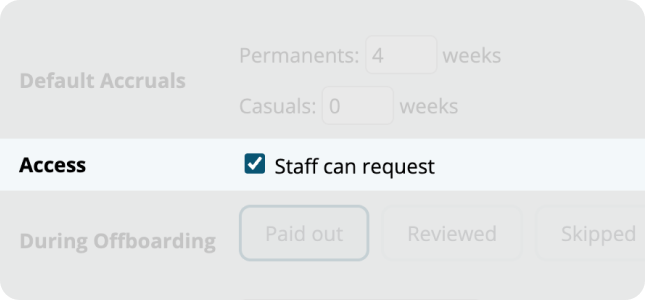
Toggle whether employees can submit their own leave requests for a leave type, or whether it shuold only be managed by payroll administrators. Useful for leave types like TOIL where requests are typically initiated by managers rather than staff.
Four accrual methods
.png)
The accrual method now matches the actual nature of each leave type:
- Pro-rata for leave that accrues progessively, like Annual Leave or Personal Leave.
- Banking hours for RDO and TOIL.
- Long Service Leave for leave that accrues from ordinary hours over the course of employment.
- Reporting only for leave types that need to be recorded but don't accrue a balance.
Configure offboarding treatment per leave type
.png)
For accruing leave types, set whether the balance is paid out, flagged for review, or skipped entirely when an employee is offboarded, with the appropriate Final STP category applied automatically. No manual step required at offboarding time.
Custom leave types for Enterprise accounts
.png)
Enterprise accounts can now add custom leave options beyond the standard set, with full configuration control over each one.
Where to find it
Head to Menu -> Settings -> General -> Global - Entitlement Settings - Leave Config to review your current leave setup.
For a full walkthrough of each setting, visit the Leave Configuration guide. And if you need a hand getting your leave types set up, our support team is available by phone and ticket, real people, no bots.

.png)