
Automated Roster Scheduling for repeating shift patterns

Stop rebuilding the same roster every single period. If your business runs a repeating shift pattern, FIFO rotations, fixed weekly schedules, rotating shift blocks, you shouldn’t have to recreate it from scratch every cycle. 

Roster Cycles lets you build the pattern once and apply it across your entire team, for any date range, in a single action.

Why manually rebuilding rosters doesn’t scale

Manually rebuilding a roster that never actually changes is one of the 
biggest time sinks in workforce scheduling.

Every new period, the same shifts get recreated for the same people in the same pattern, whether that’s a 7 on / 7 off FIFO rotation, a 5 on / 2 off retail pattern, or a rotating healthcare shift block. Copying shifts one by one, or rebuilding the whole roster from a spreadsheet, doesn’t scale once you’re managing dozens or hundreds of staff across multiple sites.

That’s exactly the gap Roster Cycles closes. 
It’s built specifically as rotating shift schedule software for businesses running predictable, repeating patterns at scale, not a general rostering tool stretched to cover it.
Check out our full Rostering module

How does Roster Cycles work?

Manually rebuilding a roster that never actually changes is one of the biggest time sinks in workforce scheduling.

Every new period, the same shifts get recreated for the same people in the same pattern, whether that’s a 7 on / 7 off FIFO rotation, a 5 on / 2 off retail pattern, or a rotating healthcare shift block.
Copying shifts one by one, or rebuilding the whole roster from a spreadsheet, doesn’t scale once you’re managing dozens or hundreds of staff across multiple sites.

That’s exactly the gap Roster Cycles closes. It’s built specifically as rotating shift schedule software for businesses running predictable, repeating patterns at scale, not a general rostering tool stretched to cover it.

1 - BUILD THE PATTERN ONCE
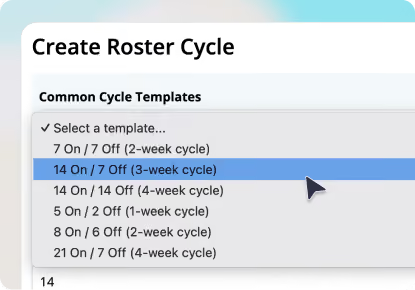
Define the total length of your repeating cycle, then configure each day, worked or off, and the shift start and finish times.
Start from one of six built-in templates covering the most common rotations:
  • 7 On / 7 Off
  • 14 On / 7 Off
  • 14 On / 14 Off
  • 5 On / 2 Off
  • 8 On / 6 Off
  • 21 On / 7 Off
Every template can be customised, or you can build a fully custom pattern from scratch for anything that doesn’t fit a standard rotation. Save cycles as Draft while reviewing, and switch to Active when ready.
Dropdown menu showing common cycle templates for creating a roster cycle, with options like '7 On / 7 Off (2-week cycle)' and '14 On / 7 Off (3-week cycle)' highlighted.
2 - APPLY IT TO A GROUP OR INDIVIDUAL
Assign a finished cycle to a group or a single employee. Set the date range, choose how many complete repetitions to run, and decide whether to:
  • Top Up: fill only the days without an existing shift, or
  • Replace: overwrite the roster entirely for that range
User interface panel showing cycle configuration with 'Apply Cycle Until' set to 'Cycle 2 ends 17/09/2026 - Project End', selection buttons for 'Method' with 'Top Up' selected, and a 'Cycle Days Preview' table listing dates from 10/09/2026 to 16/09/2026 with corresponding day numbers, statuses marked with checkmarks, and start times set to 09:00.
3 - PREVIEW BEFORE YOU COMMIT
Before anything is generated, a full preview shows every date in the cycle, the calendar date, whether it’s a worked or off day, shift times, and any shift notes. Nothing is created until you approve it.
User interface showing a cycle preview labeled '5 On - 2 Off, 7 days' with details '5 worked, 2 off' and a 'View cycle' button with cursor pointer, toggle switch set to active.
4 - GENERATE IN ONE CLICK
One click generates every shift across the selected range. A summary confirms exactly how many shifts were created and how many staff were affected, so you know precisely what changed.
5 - ADD NEW STARTERS WITHOUT BREAKING THE PATTERN
New employee joining a group with an active cycle? Their shifts don’t need to be built manually. Reapply the group assignment using Top Up, and Microkeeper recalculates the matched employee list, fills their unrostered days, and keeps them aligned with the rest of the group’s cycle, without affecting anyone else’s existing shifts.
User interface form showing work cycle set to '5 On - 2 Off,' project length from 10/09/2026 to 17/09/2026, with options to assign to 'Group' or 'Employee.' The group dropdown shows '$Payroll Rules - RIA-CAS L3-6' and location dropdown labeled 'Select Location.'

What are the benefits of Roster Cycles?

Build a rotation once instead of every period, whether that’s weekly, fortnightly, or on a 21-day FIFO cycle.

A pattern built and checked once is applied consistently every time, no manual re-entry, no missed shifts.

Apply a cycle to an entire group in one action, whether that’s 20 people or 200.

Preview every shift before it’s generated, and choose Top Up of Replace depending on what you need.

New employees slot into an existing rotation without disrupting the roster you’ve already built for everyone else.

Who is Roster Cycles built for?

Roster Cycles is purpose-built as FIFO roster software and rotating shift scheduling software for any business where the same pattern repeats predictably:

woman from hr department

Mining

FIFO rotations like 7/7, 8/6, 14/14 and 21/7, applied consistently across large crews.

woman from hr

Healthcare

Rotating shift blocks across wards, facilities and rosters that need to stay compliant and consistent.

recruiting tools

Warehousing and logistics

Fixed shift patterns across large, 
high-turnover workforces.

retail staff

Warehousing and logistics

Site-based rotations that need to be replicated across crews and projects.

retail staff

Warehousing and logistics

Site-based rotations that need to be replicated across crews and projects.

Frequently Asked Questions

What is Roster Cycles?
Roster Cycles is a Microkeeper feature that lets administrators build a repeating shift pattern once and apply it across a group or individual employee for any date range, generating weeks or months of rostered shifts automatically.
Is Roster Cycles available on all Microkeeper plans?
Roster Cycles is available on the Enterprise plan. Checkout our pricing here
Can I use Roster Cycles for FIFO rosters?
Yes, Roster Cycles supports common FIFO patterns out of the box, including 7 On / 7 Off, 14 On / 7 Off, 14 On / 14 Off, 8 On / 6 Off and 21 On / 7 Off, plus fully custom patterns for anything else. 
What’s the difference between Top Up and Replace?
Top Up fills only the days that don’t already have a shift, leaving existing rostered shifts untouched. Replace overwrites the roster entirely for the selected date range.
Can I see what will be created before it’s applied?
Yes. Before generating anything, a full preview shows every date in the cycle, whether it’s worked or off, shift times, and any notes, so you can check it’s correct before committing.
What happens when a new employee joins a team with an existing cycle?
Their shifts aren’t added automatically. Reapply the group assignment using Top Up, and Microkeeper will recalculate the employee list, fill their unrostered days, and align them with the rest of the group’s cycle, without changing anyone else’s existing shifts. 
Where do I find Roster Cycles in Microkeeper?
Menu -> Rosters -> Roster Cycle.

Build your roster once.
Apply it everywhere.

Roster Cycles is available now
for Enterprise accounts.

Book a free consultationStart a free trial