Rostering Software built for Australian shift work

Building a roster by hand stops scaling the moment you've got more than a handful of staff, more than one site, or an award that pays people differently depending on the day and the shift. Microkeeper's rostering software sits in the same system as your timesheets and payroll.

Smiling woman in blue dress sitting with text saying '45 seconds Create and share your rosters in record time.'
Store manager Steve Niresh dashboard showing staff status, hours, and today's roster for Melbourne office

What is a roster?

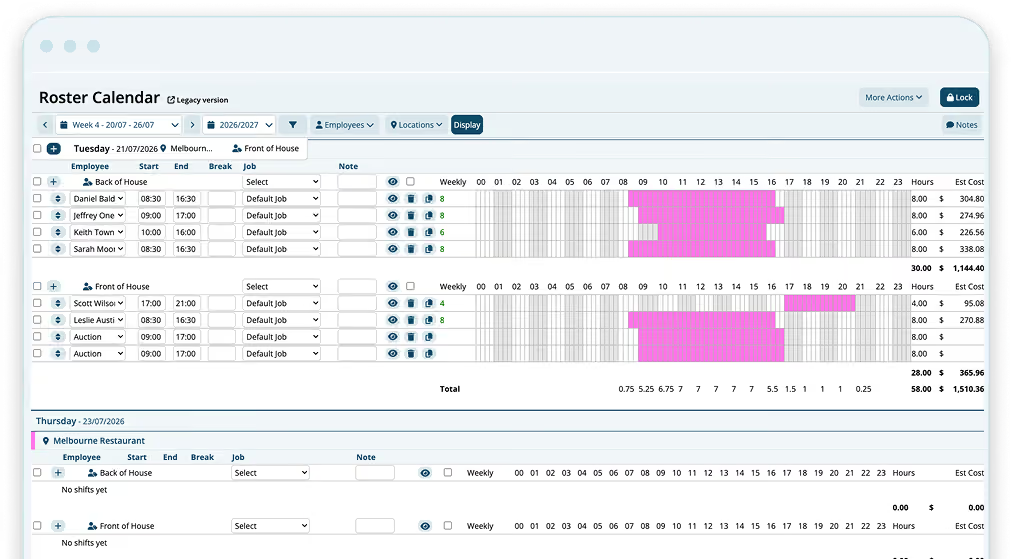
A roster is a schedule that assigns specific shifts with start times, finish times, breaks and locations, to specific staff over a set period. In Microkeeper, a roster gets built once from a template or copied from the week before, then published so staff can see their shifts from the Microkeeper employee app and managers can see coverage across the whole team in one place.

Explore the powerful features of
automated online rostering software

Our intuitive rostering tools work seamlessly with time tracking and payroll modules to reduce admin and increase shift accuracy. By combining roster management with automation, Microkeeper helps teams avoid costly mistakes and stay Fair Work compliant.

BREAK COMPLIANCE

Set break and award rules once, then let them run

Configure break and penalty rules to your award or EBA during setup, and every roster you build afterwards follows them automatically. No pre-built generic award library, no manual double-checking shift by shift.

Discover break compliance
Healthcare worker in scrubs holding coffee and phone, with a break schedule UI visible.
Woman outdoors smiling and using smartphone with a shift bidding app visible on screen.
SHIFT BIDDING

Let your team bid on open shifts

Staff can pick up or swap available shifts themselves, and the roster updates as soon as a swap is accepted, no group chat or phone calls needed to confirm it's covered.Configure break and penalty rules to your award or EBA during setup, and every roster you build afterwards follows them automatically. No pre-built generic award library, no manual double-checking shift by shift.

Discover shift bidding
JOB AND AVAILABILITY TRACKING

Roster by real availability, not guesswork

See who's available and what they're qualified for before you build the week, so the right person lands in the right shift, especially useful for casual and part-time staff whose availability changes often.Configure break and penalty rules to your award or EBA during setup, and every roster you build afterwards follows them automatically. No pre-built generic award library, no manual double-checking shift by shift.

Discover job and availability tracking
Two chefs in a kitchen with a digital overlay showing morning prep shift assignments at 100% completion.
Work roster template showing employee shifts by hour and a roster budget summary with hours and cost goals.
ROSTER TEMPLATES

Reuse your best rosters instead of rebuilding them

Save a shift pattern you use every week, then edit the starting point instead of building from a blank page, and adjust it for the weeks that need something different.

Discover roster templates
MULTI-LOCATION SCHEDULING

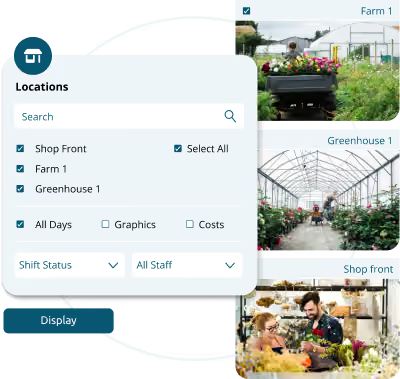
Manage every site from one login

Build and view a roster per location, while your business gets one rolled-up view across all of them, no separate files or spreadsheets per site. See who's available and what they're qualified for before you build the week, so the right person lands in the right shift, especially useful for casual and part-time staff whose availability changes often. Configure break and penalty rules to your award or EBA during setup, and every roster you build afterwards follows them automatically. No pre-built generic award library, no manual double-checking shift by shift.

Discover multi-location scheduling
Two chefs in a kitchen with a digital overlay showing morning prep shift assignments at 100% completion.
Work roster template showing employee shifts by hour and a roster budget summary with hours and cost goals.
ROSTER CYCLES

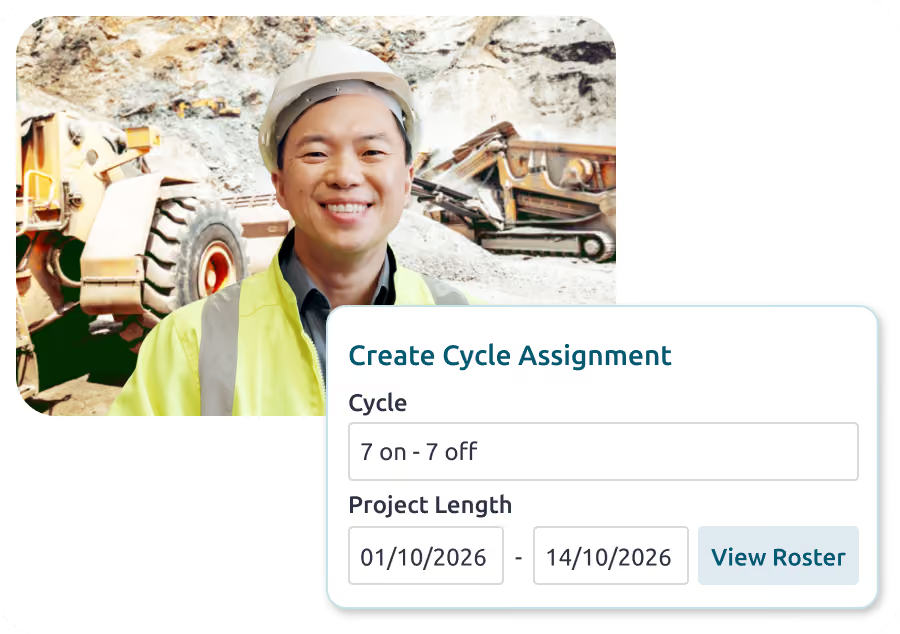
Run FIFO and rotating rosters on autopilot

On Enterprise plans, Roster Cycles let you build a repeating pattern once, like 14 on/14 off or 5 on/2 off, or a fully custom one, preview exactly which days are worked before anything's generated, and apply it to a person or group for any date range.

From Startups to Enterprise. They Use Microkeeper

Why we're considered one of the Best Roster Management Apps in Australia

Microkeeper isn’t just another scheduling tool — it’s trusted by Australian businesses as one of the best roster apps thanks to its mobile access, award-compliant automation, and seamless integration with payroll. Whether you're rostering staff in a single café or across a national franchise, Microkeeper adapts to your needs.

Rated 4.4on Software Advice
Rated 4.5 on Trustpilot
Rated 4.4 on Capterra
Rated 4.9 on Xero App Store
Rated 4.4 on GetApp

Discover how our online roster software elevates your business management

From wage cost visibility to fewer scheduling conflicts, Microkeeper's rostering software is built to be affordable, simple to use, and trusted by Australian businesses, from small teams to multi-site enterprises.

Fewer scheduling conflicts and double-ups

Automating the build catches clashes before they happen, instead of a manager spotting them after the roster's already published.

See wage costs before you publish, not after

Costs are visible while you're still building the roster, so wage budgets stay a planning input, not a surprise once payroll runs.

Microkeeper is affordable, simple to use, and trusted by Australian enterprises and small businesses.

Experience a seamless approach to workforce management that saves time and drives better business outcomes.

One system across every site

A manager oversees their own location without needing visibility into every other one, and leadership gets a single rolled-up view instead of five separate files.

Less admin, more time back

Templates and cloning mean managers spend less time rebuilding the same week from scratch, and more time on the floor or on the tasks that actually need a person.

Lower compliance risk without a compliance team

Once your award and break rules are set up, every roster built afterwards follows them, cutting the manual checking that otherwise falls on a manager.

Rostering software vs. manual and spreadsheet rosters

A spreadsheet works fine for a small, single-site team with a stable pattern. The coordination cost grows once you add headcount, sites, or shift complexity.

  Spreadsheet / Manual Roster Microkeeper
Shift data reaching payroll Re-entered by hand Same system, no re-entry
Staff access to their roster Printed, emailed, or a group chat Employee app
Repeating patterns Rebuilt or copy-pasted each cycle Templates, or Roster Cycles (Enterprise)

Covering an open shift Phone calls until someone says yes Shift bidding
Multiple locations Separate files per site One system, per-site or rolled-up view

What our clients are saying

Our clients are at the heart of what we do, and their feedback drives our commitment to excellence. Discover how businesses like yours have transformed employee scheduling, improved efficiency, and enhanced employee satisfaction with Microkeeper.

"One of the standout features is the visibility on costs as soon as we prepare the rosters. This real-time insight gives us much better control over wages, which is our biggest expense.”

Orbit Fitness logo
Mitesh, D.

"It’s super-efficient. Microkeeper lets us do costed rosters and easily share them with our staff. Being automated it also cuts out time theft.”

360Q logo
Barry, I.

"When I bring up the roster, Microkeeper tells me who is available and who’s not. Staff can tell me they want to work certain shifts, and if I have to add staff because the booking system shows we’ve had an unexpected number of extra bookings, I can put the call out on Microkeeper."

Chichester restaurant logo
Marty, P.

"You can create the roster based on your sales figures and make sure that you have the right amount of people on at the right times.”

cloud rostering software
Sam, D.

Seamlessly Connect With Your Favourite Tools

Check out our integrations
microkeeper newsletter
MICROKEEPER MONTHLY NEWSLETTER

Stay up to date

  • New features
  • Practical tips
  • Compliance news
  • Industry changes
  • Company updates
  • Payroll news

Frequently Asked Questions

What is a roster?
A roster is a schedule that assigns shifts, start times, finish times, breaks and locations, to specific staff over a set period, usually a week or a fortnight. Microkeeper builds it once, from a template or copied from the week before, then publishes it so staff and managers see the same information in one place.
What is rostering software and how does it work?
Rostering software builds and publishes staff schedules based on availability, skills and business rules. Microkeeper builds rosters in the same system as your timesheets and payroll, so a published roster flows straight through to hours worked and pay, with no re-entry.
What are the key features to look for in rostering software?
Automated break and award compliance, shift bidding, availability tracking, roster templates, and integration with payroll and time and attendance. These are the features that cut admin time and reduce compliance risk day to day.
Does rostering software handle award and Fair Work compliance automatically?
Once your award or EBA rules are configured, yes: every roster you build afterwards follows them automatically. Microkeeper doesn't ship with a pre-built award library, so that setup happens with you first, not out of the box.
Can rostering software handle recurring shift patterns, like FIFO or rotating rosters?
Yes, on Enterprise plans, through Roster Cycles. Build a repeating pattern once, such as 14 on/14 off or 5 on/2 off, or a fully custom one, and apply it across a group or an individual for any date range. Applying it can top up empty days only, or replace the roster entirely, and new starters are added with Top Up by default so existing staff's shifts aren't disturbed.
Is rostering software suitable for businesses with multiple locations?
Yes. Multi-location scheduling lets a manager build and view a roster per site, while it still rolls up into one view across the whole business.
Does rostering software work for casual staff as well as permanent staff?
Yes. A roster can include casual, part-time and full-time staff in the same schedule, with availability tracked per person.
How much does rostering software cost per employee?
It depends on which modules your business needs. Payroll-only starts at a flat $25/month for up to 10 staff; the full HR, rostering, timesheets and payroll plan is priced per user based on team size. Book a free consultation for an exact quote.

Clock-on to streamlined employee scheduling
with our online rostering software

With a full feature list and automatic integration to payroll, Microkeeper's rostering software saves you hours every week. Automated rostering, shift bidding, roster templates, notifications, shift availability, roster confirmations, calendar integrations, time off requests and job tasks, all included.

Discover more Microkeeper features...