

To roster FIFO staff, choose a swing pattern such as 8/6, 7/7 or 14/7, split your team into crews with staggered start dates, build in travel days, check the roster against your award or enterprise agreement and fatigue limits, then publish it and manage changes as exceptions to a repeating template. That is the whole job in one sentence. The hard part is doing it for 30, 80 or 200 people without rebuilding the same roster every period.
Fly-in fly-out rostering looks simple on paper because the pattern never changes. Eight days on, six days off, repeat. In practice, the pattern has to cover every shift on site, keep each person within their award or agreement, leave enough rest to manage fatigue, and then feed accurate hours into payroll at the end of every swing. Teams that run this on a spreadsheet usually discover the weak point in the middle of a swing, when someone is sick, a flight moves, or a crew change lands a day early.
This guide walks through how to build a FIFO roster properly, which patterns are most common, and what to look for in software when a spreadsheet stops being enough.
What is a FIFO roster?
A FIFO roster is a repeating cycle of days on site, known as the swing, followed by days at home, known as R&R (rest and recovery). It is written with the days on first and the days off second, so 8/6 means eight days on and six days off. A 2/1 roster means two weeks on and one week off, which is exactly the same thing as 14/7, and you will see both written in job ads and enterprise agreements.
A few terms come up constantly once you start rostering. A crew (sometimes called a panel) is a group of people who work the same swing together. A changeover is the day one crew leaves site and the next arrives. Handover is the overlap where the outgoing crew passes work to the incoming one. If you want a plain-English reference for the wider vocabulary, our glossary covers rosters and shift patterns.
What are the most common FIFO roster patterns?
There is no single correct FIFO pattern. The right one depends on how far people travel, how continuous the operation is, and what your award or enterprise agreement allows. The patterns below turn up most often.
Days on site per year are calculated as 365 x days on / cycle length, and are approximate. Always check how your agreement counts travel days.
Shorter and even-time swings are often chosen to improve wellbeing and retention, and the Western Australian code of practice on mentally healthy workplaces for FIFO workers points to shorter rosters such as 7/7 and 8/6 as examples linked to better outcomes.
The trade-off is travel. A 7/7 roster means a flight every week, and on a long commute some of the seven days off disappear into transit and recovery. A 14/14 halves the number of trips but asks for a full fortnight away.
How do you build a roster?
The method below works whether you are rostering a small contractor crew or a multi-site operation. It is the same set of decisions every time, so it is worth writing down once and reusing.
1. Define the coverage you need
Start with what the site requires, not with who is available. List each shift, the roles needed on it, the headcount per role, and any licences, tickets or inductions a person must hold to work there. Allow for leave, training and sick cover, because a roster that only works when everyone turns up is not a roster.
2. Check the award or enterprise agreement first
Hours of work, breaks, minimum time between shifts and rostered days off are set by the award or agreement that covers each person, and they differ between roles and employers. The Fair Work Ombudsman's page on hours of work, breaks and rosters is a good starting point, and Fair Work's Find My Award tool will tell you which award applies. Do this before you choose a pattern, because the agreement may already limit your options.
3. Choose the swing pattern
Pick the pattern that fits the operation and the people. Weigh the length of the swing against the travel involved, the fatigue risk of long runs of 12-hour shifts, and what your workforce will accept. If you run 24/7 production, 7/7 with two crews is a natural fit. If your site is a long way from home for most of the team, a longer swing with fewer flights may make more sense.
4. Build crews and stagger them
Split the workforce into crews with the skills each shift needs, then offset their start dates so one crew replaces another with no gap in coverage. On a 7/7 roster, Crew B starts the day Crew A finishes. Where the work needs continuity, build in a handover overlap so the outgoing crew can brief the incoming one.
5. Plan travel as part of the roster
Travel days are work-adjacent time that needs a consistent rule. Decide how mobilisation and demobilisation days are treated in contracts, payroll and fatigue calculations, and make sure your roster shows them clearly. Flights, buses and camp bookings are usually run in a separate logistics system, so the roster needs to give that system an accurate picture of who is on site and when.
6. Check fatigue and rest rules
Fatigue is a work health and safety duty, and the way work is rostered is one of the biggest factors. Safe Work Australia's Model Code of Practice on managing the risk of fatigue recommends measures such as setting rosters ahead of time and avoiding last-minute changes, giving consecutive days off so workers can get proper rest, using forward rotation for shift changes, and limiting runs of successive night shifts. Put hard limits into the roster itself: maximum consecutive shifts, maximum consecutive nights, and a minimum break between shifts.
7. Publish the roster, then manage exceptions, not the template
Once the roster is published, the underlying pattern should stay untouched. Leave, swaps, replacements and one-day overrides are exceptions that sit on top of it. Keeping that separation means you can always see what the plan was, what changed and who approved it. If you are using Microkeeper, the click-by-click process is in our roster software guide.
8. Connect the roster to timesheets and payroll
A FIFO roster is only as useful as the pay that comes out of it. Capture actual hours, overtime, allowances and variations against the roster, have supervisors approve them, and send approved data to payroll. Reconcile rostered hours against actual hours at the end of each swing, so differences are caught while people still remember what happened. Payroll and award rules are configured when you set up, so it pays to get that conversation right early.
Should you use a spreadsheet or roster software?
A spreadsheet can model your first FIFO roster, and for a small crew on a fixed pattern it may be all you need. Plenty of teams start with one, and our roster templates are a sensible bridge if you want structure without changing everything at once.
The trouble starts when the pattern, the people and the rules all have to stay in sync. A single swap can break a stagger between crews. A change to an award rule has to be applied by hand to every row. Rebuilding the same roster every period eats hours that nobody planned for, and one wrong cell becomes a pay error two weeks later. That is usually the point where teams look for software that can build the pattern once and repeat it.
What should you look for in FIFO roster software?
Whatever you choose, a few capabilities separate tools built for repeating rosters from tools stretched to cover them.
- Repeating patterns. You should be able to build a swing once and apply it to a person, a crew or a date range, rather than recreating shifts period after period.
- Crew staggering. Offsetting crews should be a setting, not a manual edit to dozens of rows.
- A preview before you commit. Seeing the worked days and days off before a pattern is applied saves you from rolling out a mistake.
- Exceptions that do not break the pattern. Leave, swaps and replacements should be overrides, not rewrites.
- Connected timesheets and payroll. Hours worked should flow from the roster into payroll without re-entry, with award interpretation set up for your agreements.
- Mobile access and local support. Crews should be able to see their roster on their phone, and someone should answer the phone when you need help.
It also helps to be clear about what you need the roster tool to do. Some FIFO platforms bundle flights, camp accommodation and site logistics alongside rostering. Others, including Microkeeper, focus on the roster itself and the timesheets and payroll that follow it, and leave travel and camp bookings to the systems built for that. Neither is wrong, but you should know which one you are buying. For a wider comparison, see our guide to the best rostering software in Australia.
How does Microkeeper handle FIFO rosters?
Microkeeper is built so the roster, the timesheets and the pay all sit in one system, supported by real people on the phone rather than a bot. For FIFO and rotating work, two parts of our rostering software do most of the heavy lifting.
Roster Cycles lets you build a repeating pattern once and apply it across your team for any date range in a single action. It supports common FIFO patterns out of the box, including 7 on / 7 off, 14 on / 7 off, 14 on / 14 off, 8 on / 6 off and 21 on / 7 off, plus fully custom patterns for anything else. You can preview the worked days before you apply the cycle, and apply it to one person, a group or a whole date range. Roster Cycles is available on the Enterprise plan.
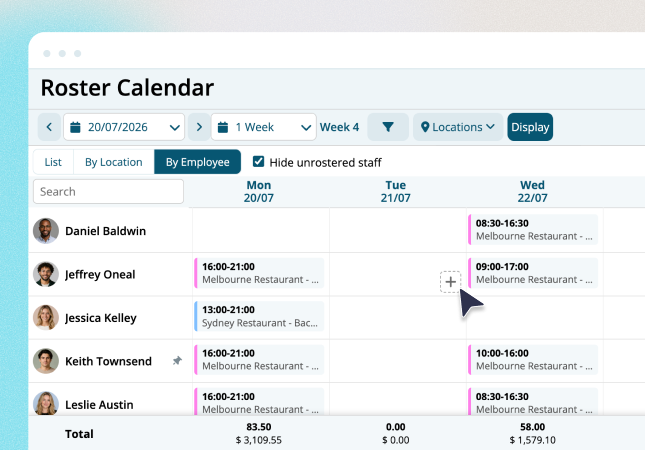
The Roster Calendar is where you see and manage the result. You can view the roster as a list, by location or by employee, and switch between a single day, a few weeks or a full month, so a manager can check cover across a whole swing at a glance and adjust individual shifts without touching the underlying pattern.
Because rostering sits in the same platform as timesheets and payroll, the hours your crews actually work flow into the pay run with award interpretation configured to your obligations at setup. Microkeeper is Australian-built, data is stored in Australia, and we hold ISO 27001:2022 certification.
If you run a mining or resources workforce, our mining industry page shows how this fits together for operations like yours.
FIFO roster questions answered
What does a 2/1 FIFO roster mean?
A 2/1 roster means two weeks on site followed by one week at home. It is the same as a 14/7 roster, so a cycle is 21 days long, and someone working it spends roughly 243 days a year on site.
How do FIFO rosters work?
A FIFO roster repeats a block of days on site (the swing) and a block of days at home (R&R). Workers travel to site on the first day of the swing and home on the last, so the pattern includes travel on the changeover days. Crews are staggered so the site is always covered.
What is an 8/6 roster?
An 8/6 roster is eight days on and six days off, repeating over a 14-day cycle. Over a year that works out to about 209 days on site. It is common in resources and contracting work, usually on 12-hour shifts.
How many days a year do you work on a 7/7 roster?
About 183. Seven days on and seven days off is a 14-day cycle, so roughly half the year is spent on site. A 14/14 roster works out the same way.
What rules apply to rosters in Australia?
Hours, breaks, minimum time between shifts and rostered days off are set by the award or enterprise agreement that covers each employee. On top of that, employers have work health and safety duties to manage fatigue. Check the instrument that applies to your people before you finalise a pattern.
Is there a FIFO roster template for Excel?
Yes, there are plenty of free templates, and they work well for a small crew on a fixed pattern. They tend to break down when crews are staggered, rules change, or the roster has to feed payroll. At that point a system that repeats the pattern and connects to timesheets saves time and errors.
Ready to stop rebuilding the same roster?
If your FIFO roster follows a pattern, your software should too. See how Roster Cycles builds a swing once and applies it across your team, or talk to our Geelong-based team about how it would work for your crews. Prefer to keep reading? Our guide to the best rostering software in Australia compares the main options.
This blog is intended as general information only and does not constitute legal or payroll advice. We recommend reviewing the relevant legislation and seeking professional advice for your specific situation.