


.svg)
.svg)


From 1 July 2026, super contributions need to reach your employees' funds within 7 business days of each pay run. We've been covering what payday super means for Australian employers, but this one is specifically for Microkeeper users: here's what's changing in the platform and what you need to do.
The short answer: for most users, the change is minimal. The platform does the heavy lifting. Here's what to expect:
A new step in your pay run
.png)
The pay run processes in Microkeeper currently has 3 steps. From July, there will be a fourth: Payday Super.
This new step sits at the end of the pay run process and is where super contributions are initiated through Beam, Microkeeper's integrated super clearing house.
If you haven't set up Beam yet, this step is where you'll do it, you'll be guided through the setup directly on the page. If Beam is already connected to your account, the step will move through automatically and contributions will be initiated as part of your standard pay run workflow.
How to set up Beam in your Microkeeper account
Super status on processed pay runs
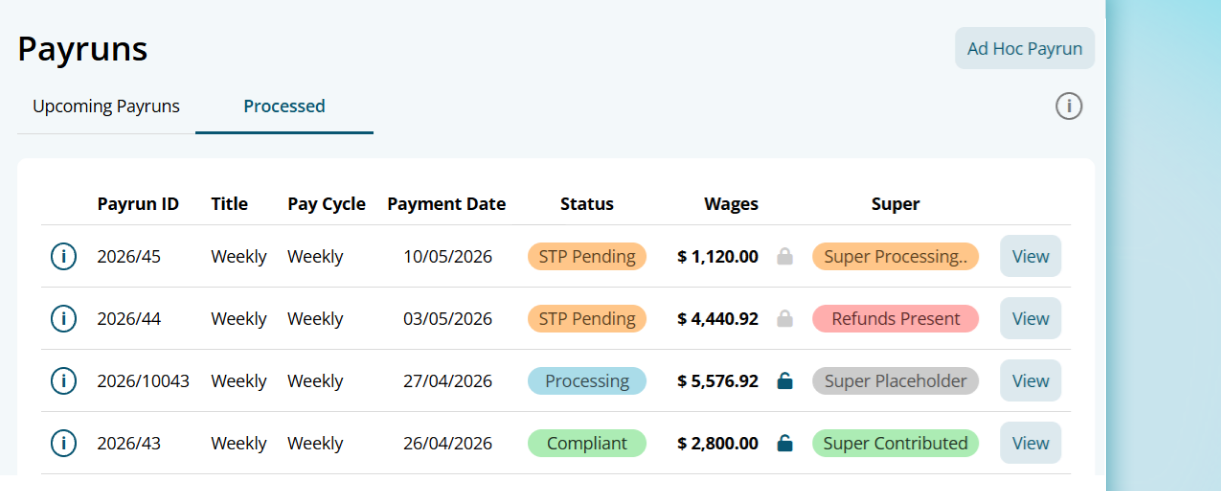
On the processed pay runs page, there is a new super status column. This gives you an at-a-glance view of where each pay run's super contribution sits. The statuses you'll see are:
- Contributed: contributions have been successfully processed.
- Processing payment: contributions are in progress through Beam.
- Refunds present: one or more contributions have been returned and need attention.
- Super action required: something needs to be resolved before contributions can be completed.
This column means you no longer need to go looking for issues, they surface directly in your pay run list.
Better handling for contributions
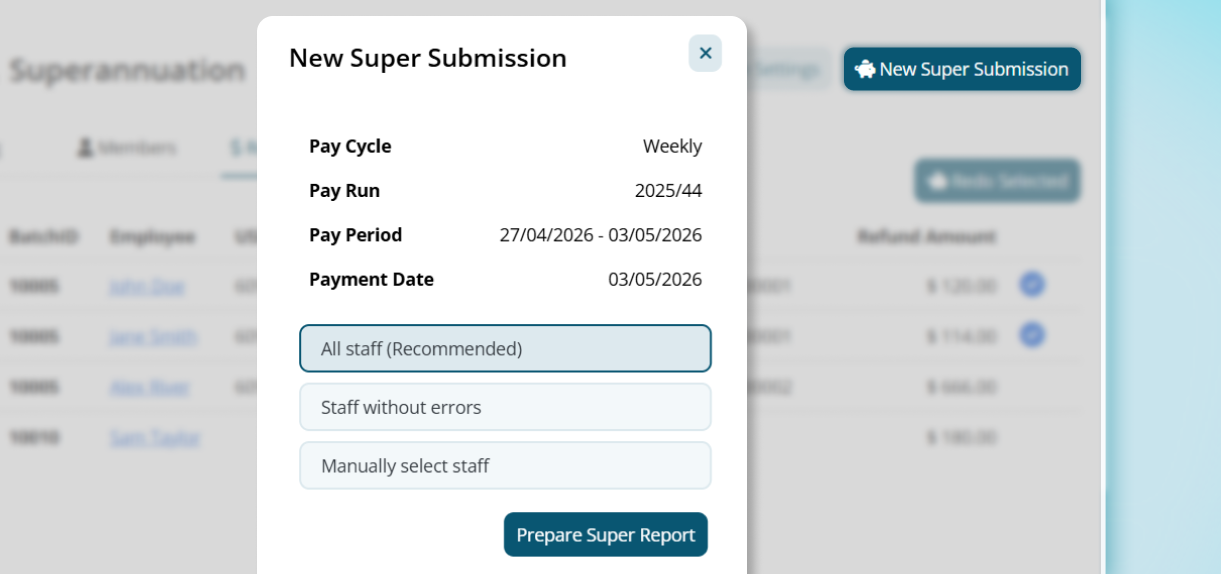
One of the most practical improvements is how Microkeeper handles employees with errors during super processing.
Previously, you would need to create a separate group of staff to process contributions and exclue those with errors or missing information manually. From July, there's a smarter filter built directly into the super processing step. When processing contributions, you can choose from:
- All staff: process contributions for everyone in the pay run.
- Staff without errors: process contributions for employees with clean data only, and skip those with issues.
- Manual selection: choose specific employees to include.
If you process using the "Staff without errors" filter, any skipped employees appear in a new Refunds/Skipped tab. From there you can see exactly who is pending, work through the issues for each person, and reprocess their contributions once resolved, without needling to reprocess the entire pay run.
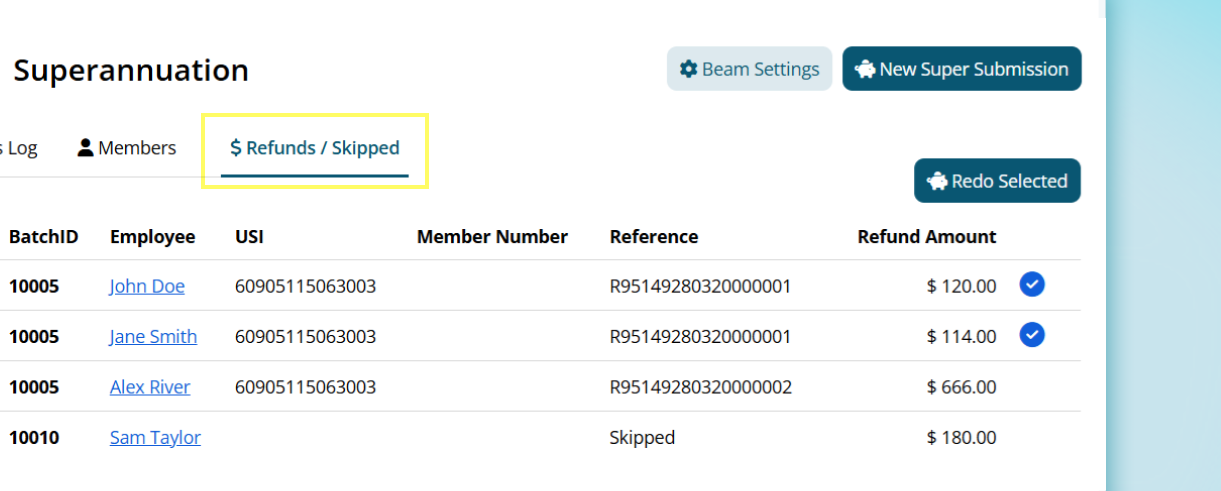
This is a meaningful improvement for larger teams where one or two data issues shouldn't hold up contributions for everyone else.
What do before July
To make sure your first payday super pay run goes smoothly:
- Connect Beam if you haven't already
Do this before your first July pay run so the new Payday Super steps flow through automatically rather than stopping for setup.
Check out the steps to connect Beam. - Audit your employee super details
Check that all employees have a current super fund nominated, their member number is correct, and their TFN is on file. Errors that were easy to fix under the quarterly model need to be resolved within 7 business days under payday super. - Review employees without fund details
Any staff missing super information will appear as errors in the new processing step. Better to find and fix these now on a pay run day.
Need a hand?
If you have questions about setting up Beam, understanding the new pay run step, or preparnig your employee data ahead of July, our support team is available by phone and ticket. Real people who know the platform and can walk you through your specific setup.
.png)
.png)


