HR Document Management Software for Australian teams

Certifications live in a spreadsheet. Contracts live in a filing cabinet. A disciplinary letter lives wherever the manager who wrote it last saved it. 

Microkeeper keeps every HR document in one system: team-wide policies, individual employee files, skills and certifications. 
Sign-off rules match how serious each document actually is. 

A general policy can just be filed for reference. A contract can require a read-and-sign. And something genuinely critical, 
like a safety induction, can be set to stop an employee clocking 
on until they’ve signed it.

Three ways Microkeeper keeps your
HR documents organised

Skill Review tracks certifications and licenses. Files store your organisation-wide policies and templates. Personal Files hold what belongs to one employee, with sign-off rules that match the document.

Annualise your wages

Track certifications and licenses before they expire.
Never let a certification lapse 
without warning.
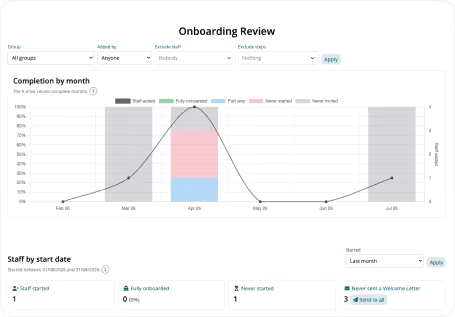
Managers can see skills pending approval, certifications approaching expiry, employees missing required qualifications, and completion progress across the team, filtered by skill or location. Open any submission, review uploaded documents, 
add notes, and approve or decline.
Onboarding Review dashboard showing a line and stacked bar chart of completion rates by month from February to July and staff start dates with categories for staff started, fully onboarded, never started, and never invited. The chart includes a vertical bar with categories for staff onboarding status in grey, blue, pink, red, and white segments. Filters are present at the top for group, added by, exclude staff, and exclude steps, with an Apply button. Staff start date filter is at the bottom with a legend for different onboarding stages.
Files

Policies, templates and documents for the whole team.
Store every document type.
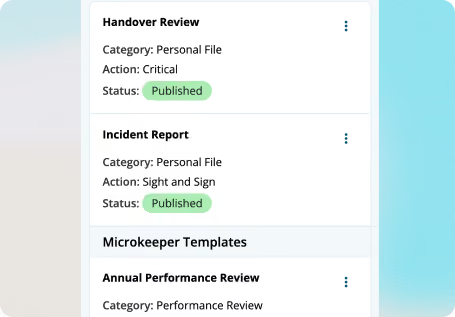
Contracts, policy manuals, training records, performance reviews and skills assessments, everything lives in one secure, cloud-based library instead of scattered folders.
Screenshot of a list showing three items: 'Handover Review' with category Personal File, action Critical, and status Published; 'Incident Report' with category Personal File, action Sight and Sign, and status Published; 'Microkeeper Templates' titled above 'Annual Performance Review' with category Performance Review.
Organise and archive without 
losing anything.
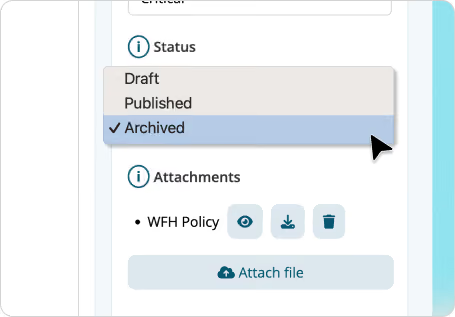
Customisable categories keep onboarding material, compliance documents and training resources easy to find. Archiving keeps old records out of the way without deleting them, matched to your retention needs.
Dropdown menu under Status with options Draft, Published, and Archived, with Archived selected, cursor pointing to it; below, Attachments section shows a file named WFH Policy with icons to view, download, and delete, plus an Attach file button.
Templates and a document builder.
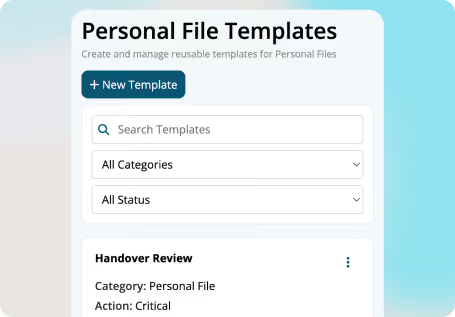
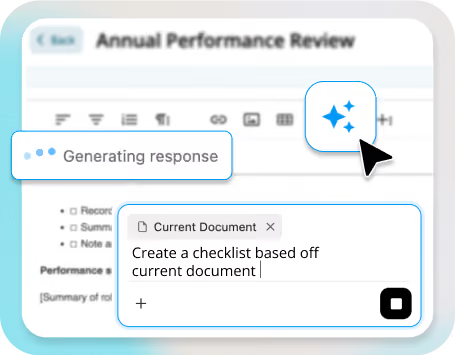
Use ready-made templates for common policies and forms, or build your own so employees can complete assessments and sign-offs directly in the platform.
User interface section titled Personal File Templates with a button labeled New Template, search bar, dropdowns for categories and status, and a partial view of a template named Handover Review under Personal File category marked as critical.
Set documents to expire.
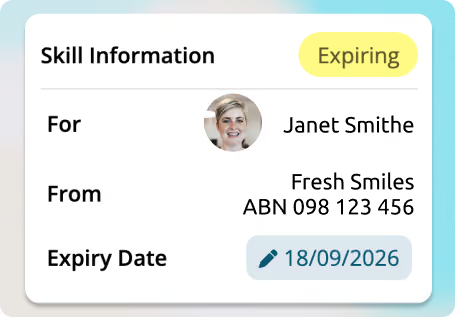
Put an expiry date on a licence, an insurance certificate, or a policy that needs an annual refresh, and Microkeeper flags it before it lapses.
A skill information card showing that the skill is expiring. It is for Janet Smithe with a small profile photo. The skill is from Fresh Smiles, ABN 098 123 456, and the expiry date is 18/09/2026 with a pencil icon next to the date.
High-level security.
Encryption and access controls keep sensitive employee information protected while it stays easy for the right people to reach.
Person wearing glasses and a blue shirt typing on a laptop at a desk with a smartphone nearby, in a modern office setting.
Pesonal files

One place for what belongs to a single employee
Everything about one employee, 
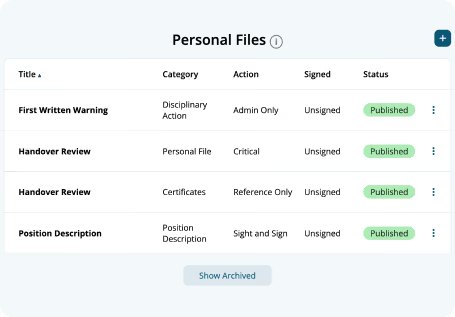
in one file.Contracts, disciplinary letters, incident reports and performance reviews for an individual live in their Personal File, not scattered across email threads and paper folders.
Table showing personal files with columns titled: Title, Category, Action, Signed, and Status. Four rows list: First Written Warning (Disciplinary Action, Admin Only, Unsigned, Published); Handover Review (Personal File, Critical, Unsigned, Published); Handover Review (Certificates, Reference Only, Unsigned, Published); Position Description (Position Description, Sight and Sign, Unsigned, Published). A Show Archived button is below the table.

How sign-off levels work

The employee can view it. 
No action required, for a general 
policy update.

The employee has to open it and confirm they’ve read it, with a timestamped record for you.

The employee can’t start their next rostered shift in Microkeeper until they’ve signed. Built for safety inductions and anything non-negotiable.

Visible only to HR and management, 
for disciplinary letters and incident reports that shouldn’t sit in a general file.

Why it's worth moving HR documents into one system

woman from hr department

Nothing falls through the cracks before it becomes a problem.

An expiring licence or an unsigned safety document gets flagged automatically, instead of turning up during an audit or after an incident.

woman from hr department

One less compliance risk resting on someone’s memory.

Critical sign-offs are enforced by the system, not by whether a manager remembered to chase them up.

woman from hr department

HR, rostering and payroll see 
the same record.

Sign-off status lives in the same system as your roster, so a critical document can actually stop someone clocking on. A standalone 
HR document tool bolted onto separate rostering software can’t do that.
Learn more about 
Microkeeper’s payroll software.

woman from hr department

Less admin, 
more paper trail.

Managers can submit and review documents on an employee's behalf, so records stay complete without chasing paperwork by hand.

Frequently Asked Questions

What is Microkeeper’s HR document storage and tracking software?
Microkeeper HR document system is a cloud-based platform that centralises your organisation’s policies and templates, individual employee records, and skills and certification tracking, in one place, with sign-off rules that match how serious each document is.
What’s the difference between Files and Personal Files?
Files store documents relevant to your whole organisation: policies, templates, training material. Personal files store documents specific to one employee: their contact, performance reviews, disciplinary letter and incident reports.
Can a document really stop someone from clocking on?
Yes. Set a document’s sign-off level to critical, and that employee can’t clock on for their next shift in Microkeeper until they’ve signed it, built for safety inductions and anything you can’t afford someone to skip.
What types of documents can I store in the system?
Organisation-wide documents like contracts, training material, policy manuals, compliance documents, licenses and skills assessments go in Files. Documents specific to one employee, including disciplinary letters, incident reports and performance reviews, go in their Personal File.
Can I automate compliance tracking with this system?
Yes. Automated tracking monitors document statuses, expiry dates and required updates, so your organisation can stay on top of changing requirements without manually chasing every certificate and licence.
How does the customisable document template feature work?
You can create standardised templates for common HR documents like policies and procedures, tailored to your organisation, so every version stays consistent instead of drifting over time.
Is it easy for employees to access their own documents?
Yes. Employees can view their documents, complete forms online, and sign off where required, directly through the platform, without HR chasing paperwork by email.
How long do I need to keep employee records in Australia?
Retention requirements depend on the type of record and current Fair Work and ATO rules, so check the specific period that applies to your business before setting a policy. Microkeeper’s archiving and expiry features are built to support whatever retention schedule you land on, documents can be archived rather than deleted, and expiry dates trigger a review rather than automatic removal.
What kind of reporting does Microkeeper offer for documents?
Reporting tools show usage patterns, outstanding sign-offs, and compliance status across your team, so you can see gaps before they become a problem instead of finding out during an audit.

Everything included:

Skill Review
Personal Files
Files
Secure cloud storage
Document templates and builder
Expirty Alerts and
reminders
Four-tier Sign-off